VR streaming apps like Meta Horizon Link or Steam Link rely heavily on Zeroconf-style
device discovery—a design that often fails on complex consumer networks
where L2 adjacency can’t be assumed.
There is no easy way to manually input a unicast IP address and connect. On different subnets,
the headset simply can’t see the PC.
This design, relying entirely on device discovery (UDP broadcasts, mDNS, or even a central directory),
is what I call broadcastism.
A common workaround in enterprise environments is to set up multicast routing (for the mDNS crowd) and
use UDP helpers (for UDP broadcast use cases).
Typical consumer networks lack the multicast routing or UDP helpers required to bypass broadcastism.
That’s where brdisco comes in, bridging the gaps left by broadcastism.
brdisco
General-purpose bridge for service discovery
brdisco divides and conquers various broadcastisms:
- UDP broadcasts / multicasts: translating them into a set of UDP unicasts
- mDNS: spoofing answers, proxying queries or acting as a reflector (like
avahi) - SSDP / UPnP / …: spoofing, proxying, or reflecting multicast traffic
With interoperability in mind, it supports several operation modes:
- userspace NAT (raw sockets)
Linux ebtables + iptables (not for now: legacy + overly complex)- Linux
nftables API - Linux
tc (traffic control) API
Case study: VR streaming across L3 subnets
Setup:
- Headset: Quest 2 (Wi-Fi,
192.168.1.246/24 @ LAN) - Gateway (OpenWrt,
192.168.1.1/24 @ LAN – 192.168.13.254/24) - Gaming PC (Ethernet,
192.168.42.69/24)
Broadcastism comparison:
- Meta Horizon Link (Oculus Link): mDNS ONLY
- Steam Link: broadcast + central directory, but VR gated by local discovery
- Virtual Desktop: central directory + local broadcast fallback
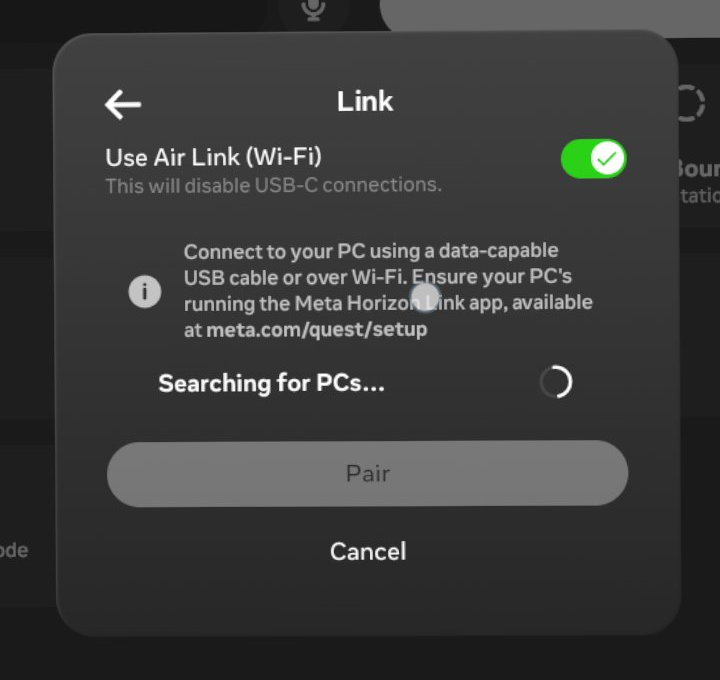
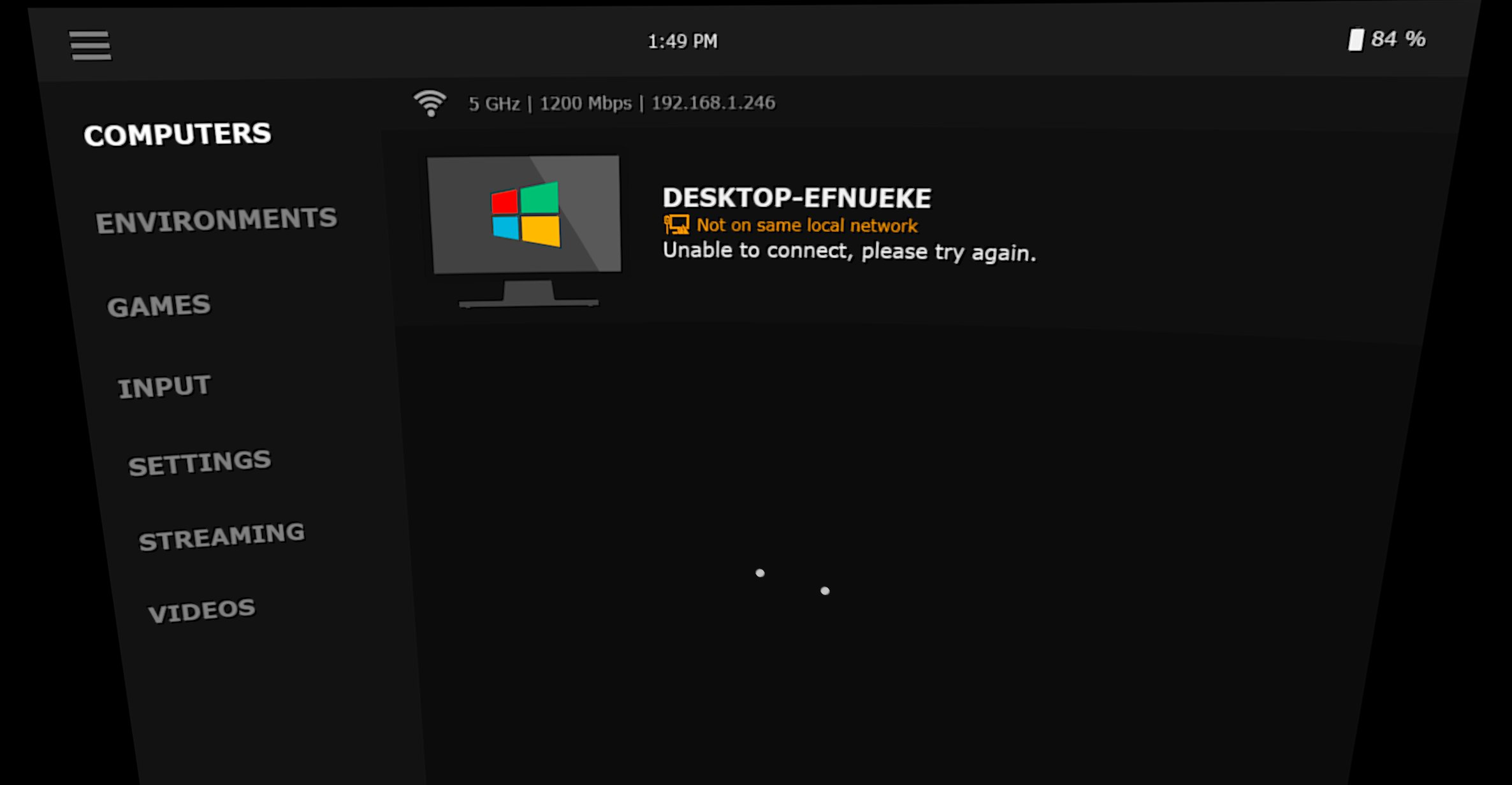
Meta Horizon Link, the default streaming app for Quest, has no service directory.
It struggles with local discovery—the purest form of broadcastism—and finds nothing:
Under the hood, the discovery is built on mDNS—the headset sends mDNS queries
and Meta app on PC is supposed to respond with its own IP and local name.
# Headset
IP 192.168.1.246.5353 > mdns.mcast.net.5353: 1 PTR (QU)? _oculusal_sp_v2._tcp.local. (44)
IP6 fe80::[redacted-q2].5353 > ff02::fb.5353: 1 PTR (QU)? _oculusal_sp_v2._tcp.local. (44)
# PC
No.	Time	Source	Destination	Protocol	Length	Info
1	0.000000	192.168.42.69	224.0.0.251	MDNS	83	Standard query 0x0000 PTR _oculusal_sp._tcp.local, "QM" question
2	0.000455	fe80::[redacted-pc]	ff02::fb	MDNS	103	Standard query 0x0000 PTR _oculusal_sp._tcp.local, "QM" question
3	0.001223	fe80::[redacted-pc]	ff02::fb	MDNS	524	Standard query response 0x0000 PTR user::DESKTOP-EFNUEKE(3)._oculusal_sp._tcp.local PTR user::DESKTOP-EFNUEKE(1)._oculusal_sp._tcp.local SRV 0 0 51873 DESKTOP-EFNUEKE.local SRV 0 0 63196 DESKTOP-EFNUEKE.local A 192.168.42.69 AAAA fe80::[redacted-pc] A 192.168.42.69 AAAA fe80::[redacted-pc]
4	0.001734	192.168.42.69	224.0.0.251	MDNS	504	Standard query response 0x0000 PTR user::DESKTOP-EFNUEKE(3)._oculusal_sp._tcp.local PTR user::DESKTOP-EFNUEKE(1)._oculusal_sp._tcp.local SRV 0 0 51873 DESKTOP-EFNUEKE.local SRV 0 0 63196 DESKTOP-EFNUEKE.local A 192.168.42.69 AAAA fe80::[redacted-pc] A 192.168.42.69 AAAA fe80::[redacted-pc]
5	1.398610	192.168.42.69	224.0.0.251	MDNS	86	Standard query 0x0000 PTR _oculusal_sp_v2._tcp.local, "QM" question
6	1.399063	fe80::[redacted-pc]	ff02::fb	MDNS	106	Standard query 0x0000 PTR _oculusal_sp_v2._tcp.local, "QM" question
7	1.399791	fe80::[redacted-pc]	ff02::fb	MDNS	539	Standard query response 0x0000 PTR user::DESKTOP-EFNUEKE(6)._oculusal_sp_v2._tcp.local PTR user::DESKTOP-EFNUEKE(7)._oculusal_sp_v2._tcp.local SRV 0 0 51872 DESKTOP-EFNUEKE.local SRV 0 0 63097 DESKTOP-EFNUEKE.local A 192.168.42.69 AAAA fe80::[redacted-pc] A 192.168.42.69 AAAA fe80::[redacted-pc]
8	1.400241	192.168.42.69	224.0.0.251	MDNS	519	Standard query response 0x0000 PTR user::DESKTOP-EFNUEKE(6)._oculusal_sp_v2._tcp.local PTR user::DESKTOP-EFNUEKE(7)._oculusal_sp_v2._tcp.local SRV 0 0 51872 DESKTOP-EFNUEKE.local SRV 0 0 63097 DESKTOP-EFNUEKE.local A 192.168.42.69 AAAA fe80::[redacted-pc] A 192.168.42.69 AAAA fe80::[redacted-pc]
9	2.402437	192.168.42.69	224.0.0.251	MDNS	86	Standard query 0x0000 PTR _oculusal_sp_v2._tcp.local, "QM" question
These mDNS advertisements are right here on PC, but they cannot traverse beyond the network
where the gear is, due to the nature of how multicast is treated in consumer networks—effectively
same as broadcast.
mDNS multicasts on 224.0.0.251 / ff02::fb (or FQDN mdns.mcast.net.). Setting up
multicast routing / reflectors is the proper move here, but that’s highly intrusive and not
even plausible in consumer networks—each L3 hop between the headset and PC requires
additional setup, if any intermediate hop does not support it, “out of luck”.
A more straightforward workaround is to spoof traffic. That’s really hacky and dirty in enterprises
but kind of clean in small-scale networks like consumer networks. So right now brdisco has
implemented a mDNS response spoofer: it can respond to mDNS queries with the configured address.
[services.oculus.mdns]
[[services.oculus.mdns.entries]]
name = "My Desktop"
service = "_oculusal_sp._tcp"
port = 63196
address = "192.168.42.69"
[[services.oculus.mdns.entries]]
name = "My Desktop"
service = "_oculusal_sp_v2._tcp"
port = 63097
address = "192.168.42.69"
The trick is working like a charm:
01:23:43.857471 IP 192.168.1.246.5353 > mdns.mcast.net.5353: 1 PTR (QU)? _oculusal_sp_v2._tcp.local. (44)
01:23:43.857675 IP6 fe80::[redacted-q2].5353 > ff02::fb.5353: 1 PTR (QU)? _oculusal_sp_v2._tcp.local. (44)
01:23:44.878369 IP 192.168.1.246.5353 > mdns.mcast.net.5353: 2 PTR (QM)? _oculusal_sp_v2._tcp.local. (44)
01:23:44.878501 IP6 fe80::[redacted-q2].5353 > ff02::fb.5353: 2 PTR (QM)? _oculusal_sp_v2._tcp.local. (44)
01:23:44.879295 IP 192.168.1.1.5353 > mdns.mcast.net.5353: 0*- [0q] 1/0/3 PTR My Desktop._oculusal_sp_v2._tcp.local. (120)
01:23:45.877616 IP 192.168.1.246.5353 > mdns.mcast.net.5353: 3 PTR (QM)? _oculusal_sp_v2._tcp.local. (44)
01:23:45.877741 IP6 fe80::[redacted-q2].5353 > ff02::fb.5353: 3 PTR (QM)? _oculusal_sp_v2._tcp.local. (44)
01:23:45.878526 IP 192.168.1.1.5353 > mdns.mcast.net.5353: 0*- [0q] 1/0/3 PTR My Desktop._oculusal_sp_v2._tcp.local. (120)
01:23:49.253433 IP 192.168.1.246.5353 > mdns.mcast.net.5353: 0 [1a] [2q] PTR (QM)? _oculusal_sp_v2._tcp.local. PTR (QM)? _oculusal._tcp.local. (85)
01:23:49.253567 IP6 fe80::[redacted-q2].5353 > ff02::fb.5353: 0 [1a] [2q] PTR (QM)? _oculusal_sp_v2._tcp.local. PTR (QM)? _oculusal._tcp.local. (85)
01:23:50.241335 IP 192.168.1.246.5353 > mdns.mcast.net.5353: 0 [1a] [2q] PTR (QM)? _oculusal_sp_v2._tcp.local. PTR (QM)? _oculusal._tcp.local. (85)
01:23:50.241551 IP6 fe80::[redacted-q2].5353 > ff02::fb.5353: 0 [1a] [2q] PTR (QM)? _oculusal_sp_v2._tcp.local. PTR (QM)? _oculusal._tcp.local. (85)
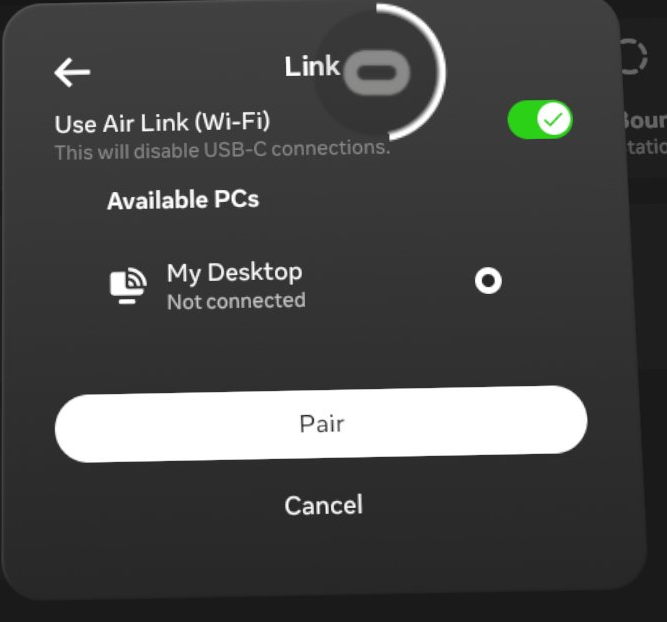
Steam Link / Virtual Desktop
In contrast to Meta Horizon Link, Steam Link and Virtual Desktop both send UDP broadcasts
to discover local devices. They do support central service directories as well to discover
anything beyond the (link-)local network, but with caveats.
# Steam Link
IP 192.168.1.246.27036 > 255.255.255.255.27036: UDP, length 30

# Virtual Desktop
IP 192.168.1.246.40172 > 255.255.255.255.38850: UDP, length 304
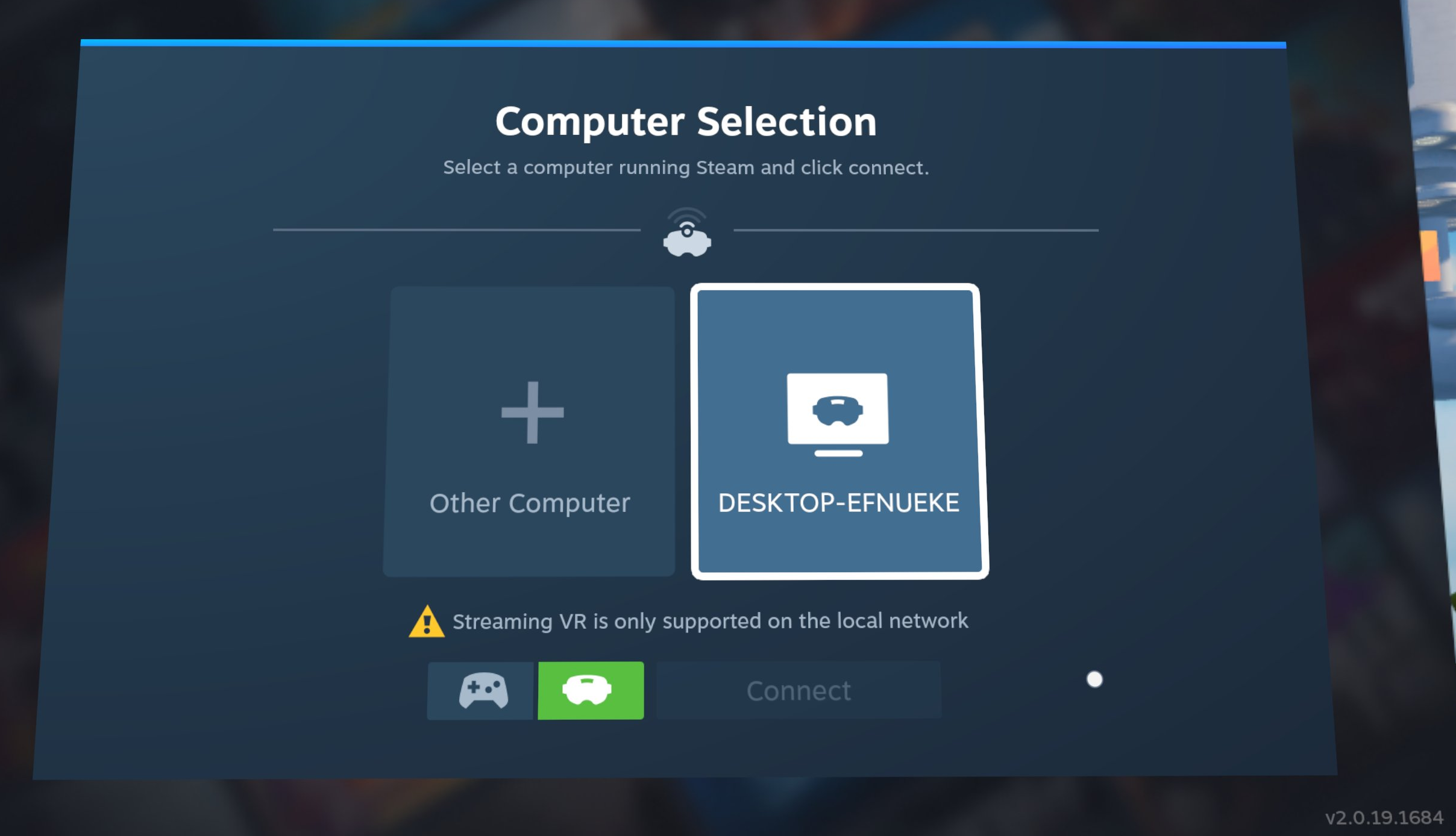
Steam Link always requires local discovery for VR streaming even on a remotely paired
device, otherwise it will prompt
Streaming VR is only supported on the local network
The only option available here is gamepad mode that’s literally Steam Remote Play without VR Streaming.
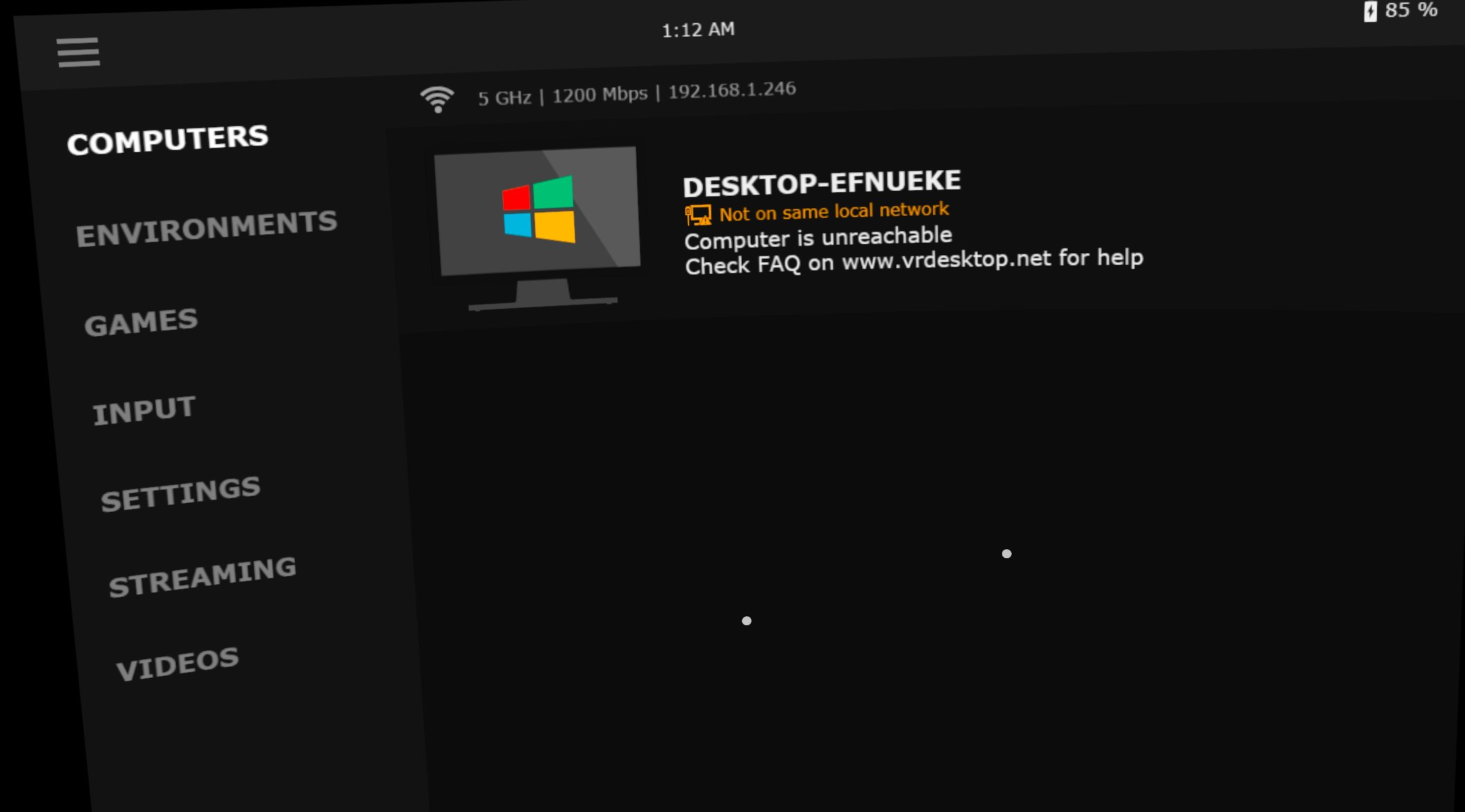
Virtual Desktop, on the other hand, is more flexible with remote discovery. However, it can
still fail when:
brdisco has implemented userspace UDP helpers to convert a broadcast into unicasts
towards configured target hosts.
[services.virtual-desktop.udp]
ports = 38850
targets = ["192.168.42.69"]

[services.steam-link.udp]
ports = 27036
targets = ["192.168.42.69"]
At least for now, it covers the use cases of Steam Link / Virtual Desktop. Hopefully it might
also bridge the gaps in other apps that send UDP discovery broadcasts.
13:20:13.705375 IP 192.168.1.246.27036 > 255.255.255.255.27036: UDP, length 30
13:20:13.705809 IP 192.168.13.254.27036 > 192.168.42.69.27036: UDP, length 30
13:20:13.705828 ethertype IPv4, IP 192.168.13.254.27036 > 192.168.42.69.27036: UDP, length 30
13:20:13.708157 ethertype IPv4, IP 192.168.42.69.27036 > 192.168.13.254.27036: UDP, length 41
13:20:13.708157 IP 192.168.42.69.27036 > 192.168.13.254.27036: UDP, length 41
13:20:13.708211 IP 192.168.42.69.27036 > 192.168.1.246.27036: UDP, length 41
13:20:15.444279 ethertype IPv4, IP 192.168.42.69.27036 > 192.168.13.254.27036: UDP, length 244
13:20:15.444279 IP 192.168.42.69.27036 > 192.168.13.254.27036: UDP, length 244
13:20:15.444376 IP 192.168.42.69.27036 > 192.168.1.246.27036: UDP, length 244
13:27:58.872971 IP 192.168.1.246.40172 > 255.255.255.255.38850: UDP, length 304
13:27:58.873367 IP 192.168.13.254.40172 > 192.168.42.69.38850: UDP, length 304
13:27:58.873381 ethertype IPv4, IP 192.168.13.254.40172 > 192.168.42.69.38850: UDP, length 304
13:27:58.874610 ethertype IPv4, IP 192.168.42.69.38850 > 192.168.13.254.40172: UDP, length 1296
13:27:58.874610 IP 192.168.42.69.38850 > 192.168.13.254.40172: UDP, length 1296
13:27:58.874683 IP 192.168.42.69.38850 > 192.168.1.246.40172: UDP, length 1296
13:27:58.874696 IP 192.168.42.69.38850 > 192.168.1.246.40172: UDP, length 1296
To sum up
The ideology of Zeroconf is pervasive—DHCP, often overlooked, is one example.
However, users can always fall back on a manually configured IP if DHCP fails.
VR streaming apps differ: even with central directory support, they rely heavily on local
discovery and remain vulnerable to single points of failure.
I know it takes a lot of time for devs to implement discovery-based systems. But still,
a manual connection should be left as an option since it doesn’t take much time after all.
Hopefully you’ll find brdisco useful in bridging these gaps. If you’re not up for running it,
the appendices include some manual tricks to tackle broadcastism. And for those who tinker with
VR networks, may your streams always reach their destination—
Long live the unicasts!
Appendix A: Common ports in VR streaming
disclaimer: observed, not official
[updated at 2025-12-27]
Virtual Desktop
| Port / Range | Protocol | Note |
|---|
| 38810 | TCP | N/A |
| 38820 | TCP | N/A |
| 38830 | TCP | N/A |
| 38840 | TCP | N/A |
| 38850 | TCP/UDP | service discovery |
Steam Link (Steam Remote Play + VR Streaming)
| Port / Range | Protocol | Note |
|---|
| 27031 | UDP | N/A |
| 27036 | TCP/UDP | service discovery |
| 27037 | TCP | N/A |
| Port / Range | Protocol | Note |
|---|
| 10400–10401 | UDP | N/A |
| Port / Range | Protocol | Note |
|---|
| 63096-63097 | TCP | _oculusal_sp_v2._tcp.local. |
| 63195-63196 | TCP | _oculusal_sp._tcp.local. |
| 61678 | TCP | N/A |
| 4445 | TCP | casting |
Appendix B: Manual workarounds
It might be troublesome to compile or run brdisco on your router, so here come some manual
workarounds to fight against VR broadcastisms.
Add a host entry to /etc/avahi/hosts:
192.168.42.69 meta.local
Create a service entry at /etc/avahi/services/meta.service:
<?xml version="1.0" standalone='no'?><!--*-nxml-*-->
<!DOCTYPE service-group SYSTEM "avahi-service.dtd">

<service-group>
  <name replace-wildcards="yes">PC Relayed via %h</name>
  <service>
    <type>_oculusal_sp._tcp</type>
    <host-name>meta.local</host-name>
    <port>63196</port>
  </service>
  <service>
    <type>_oculusal_sp_v2._tcp</type>
    <host-name>meta.local</host-name>
    <port>63097</port>
  </service>
</service-group>
Steam Link / Virtual Desktop: nftables
Necessary changes in the configuration:
eth0 -> LAN interface name192.168.42.69 -> remote PC
table netdev broadcastism {
    chain unicastify {
        type filter hook ingress device eth0 priority filter; policy accept

        # Virtual Desktop
        pkttype broadcast ether type ip udp dport 38850 ether daddr set 02:00:00:00:00:01 ip daddr set 192.168.42.69 pkttype set unicast counter

        # Steam Link
        pkttype broadcast ether type ip udp dport 27036 ether daddr set 02:00:00:00:00:01 ip daddr set 192.168.42.69 pkttype set unicast counter
    }
}
Save it at /etc/nftables.conf.brdisco and run with privileges:
nft -f /etc/nftables.conf.brdisco